Incident Response in the Neocloud - Nebius (Part I)
TL;DR
In this three part series, we define the Neocloud landscape, identify the threat landscape and break down the IR essentials for Neoclouds. If you have an AWS background, you’ll find Nebius's structure familiar. To help you move faster, we built the Invictus-Nebius script to automate your data acquisition. Whether it’s locking down IAM or centralizing your logs in Neoclouds, the goal is the same: the best time to prepare was yesterday; the second best time is now. The absolute worst time is during an incident.
Series Roadmap:
- Part 1: Nebius
- Part 2: CoreWeave (Coming Soon)
- Part 3: Lambda Labs (Coming Soon)
Want to elevate your cloud incident response skills, check out CloudLabs, a safe environment to upskill and practice with real incident response cases
Introduction
What if I told you there's a whole new world out there...Yes, it’s time to talk about Neoclouds from an incident response perspective. It might be that you're reading this and wondering what Neoclouds are, don't worry we got you covered. Also, don’t panic, we distill this down to the same fundamentals you are familiar with on normal cloud incident response cases. Ready to see how deep the rabbit hole goes?
Neocloud
The AI Threat landscape
Before we jump into the technicals, we should briefly discuss the threat landscape around AI and Neoclouds. After all, the threat is what causes the 5pm Friday call for us incident responders.
In the Neocloud space, the threat landscape is evolving rapidly. While intelligence maturity is still catching up to the technology, both public reporting and first-hand experience at Invictus highlight five high-relevancy threat vectors.
Nebius
We are kicking things off with Nebius. Why Nebius? Well, they are based in the Netherlands, so we want to start this journey in our own backyard.
Nebius has two offerings:
- AI Cloud, this is the Neocloud offering access to GPUs and storage for AI workloads
- Nebius Token Factory, this is a playground to test various large language models (LLMs), this also includes models for mathematics and image generation.
For the purpose of this blog we focus on the AI cloud offering.
Hierarchy
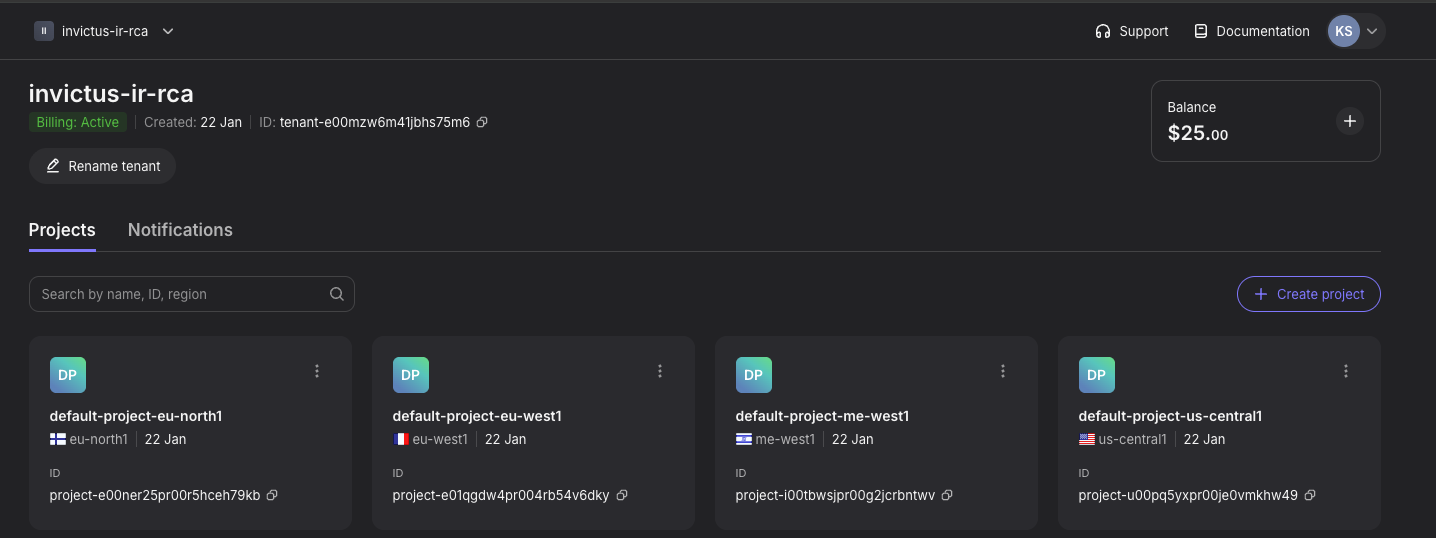
Within Nebius your resources are organized into a parent-child structure of Tenants and Projects.
- Tenants: A stand-alone workspace that you can use to set up various projects. A tenant isolates resources, provides separate IAM access and controls billing. Lastly, each tenant has its own Tenant ID and Name.
- Projects: When you create a tenant, it automatically spins up four default projects (often spread across EU and US regions).
Based on this picture below we can see in this example that the tenant ID is tenant-e00mzw6m41jbhs75m6 and the name is invictus-ir-rca.
For an incident responder, this hierarchy is the key to scoping. Knowing the Tenant ID and the Name allows you to immediately define the blast radius. A compromise in one project doesn't necessarily mean the entire tenant is affected. By understanding this structure, you can contain a threat surgically within a project without shutting down an entire global operation.
IAM
In Neoclouds, one of the most important topics is IAM because just like with normal clouds, an identity is required to perform any activity. For each investigation you'll want to make sure you understand the following:
- Who has access?
- What type of access?
- The method of access?
Within Nebius IAM the following components are available:
- Users
- Groups
- Service accounts
- Federations

Groups
Nebius comes with four built-in groups, but you can also create custom groups in the picture below, we've added an Incident Response group for the IR team.
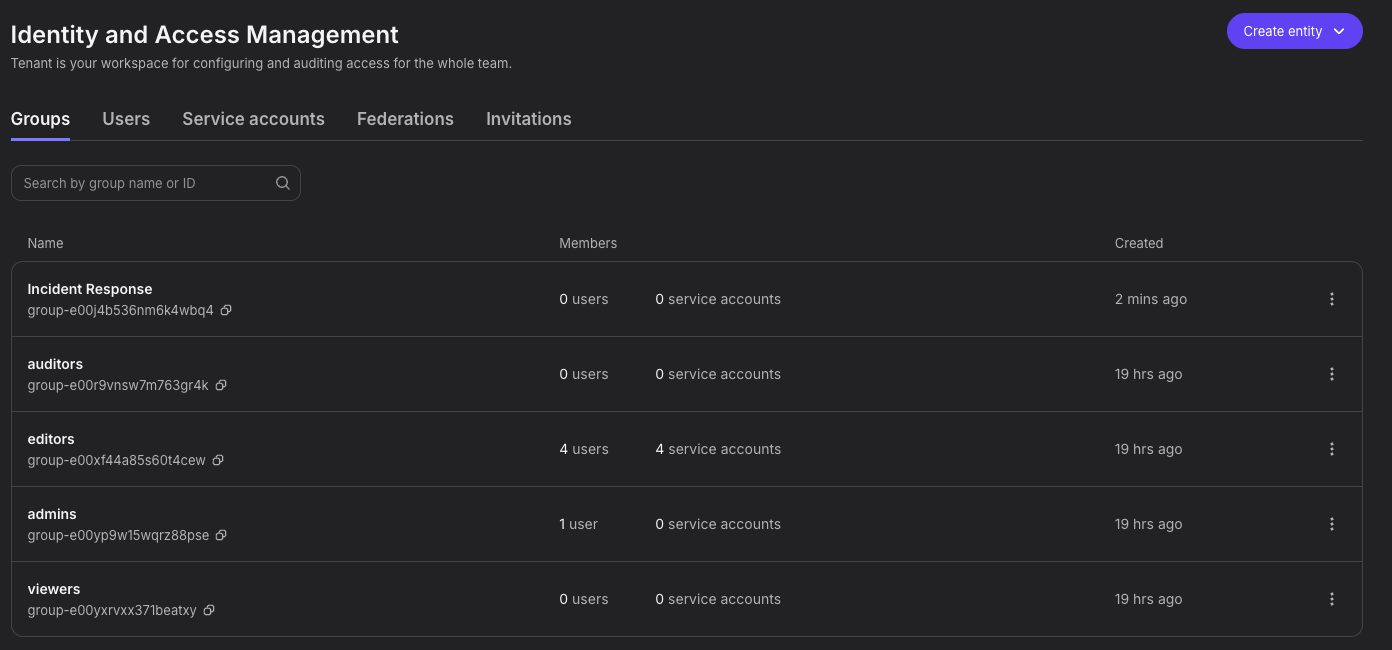
Within a group you can add members and Access Permits this just means permissions. The nice thing is you can setup permissions on a Tenant or Project level.

For an IR group we suggest having global viewer permissions so you can see all resources including security settings.

Users
Nebius manages identities via either Direct Invitation or Federation (e.g., Entra ID). For Incident Response, this distinction dictates where detection and response should take place. With invited users, containment controls reside entirely within Nebius. With federated users, however, Nebius only sees the successful login token; it does not see the authentication attempts. This means critical attack indicators such as brute force attacks, impossible travel, or MFA fatigue will exist only in your external IdP logs (e.g. Entra Sign-in logs). Requiring responders to pivot out of Nebius immediately to assess the full scope of the compromise.

Service accounts
Service accounts are a space you need to watch closely because it will likely be a target for abuse. Service accounts are used for programmatic access and tasks (e.g., scripts, images and container registries). So, they will likely be a favorite choice for threat actors.
Each service account has a (random) name and ID. You can grant or limit access using Groups, service accounts authenticate via two methods:
- Using an Access key, - this method is used for specific APIs such as the storage API
- Using an Authorized key, - this method is used for the Nebius CLI
With one of the keys the service account requests a token from Nebius IAM; and with the token, the service account can perform actions. Nebius only allows creating and using access keys for service accounts to Logging and the Container Registry. So a scenario where an access key is leaked should not lead to a compromise of IAM directly. Regardless it's crucial to protect these types of identities
Logging & Forensics
Nebius has a lot of similarity to AWS and you can also see that in the logging component. Nebius has two audit log types:
- Control Plane logging
- Data Plane logging (In Preview)
The Control Plane logging is is in JSON format and follows the CloudEvents specification. To access the logs you can either use the GUI via Manage --> Audit Logs or the Nebius CLI with nebius audit v2 audit-event.

Within each event there are a lot of different fields, in this example event a Public Key was created, the other fields highlighted are required to get the full picture of the event.
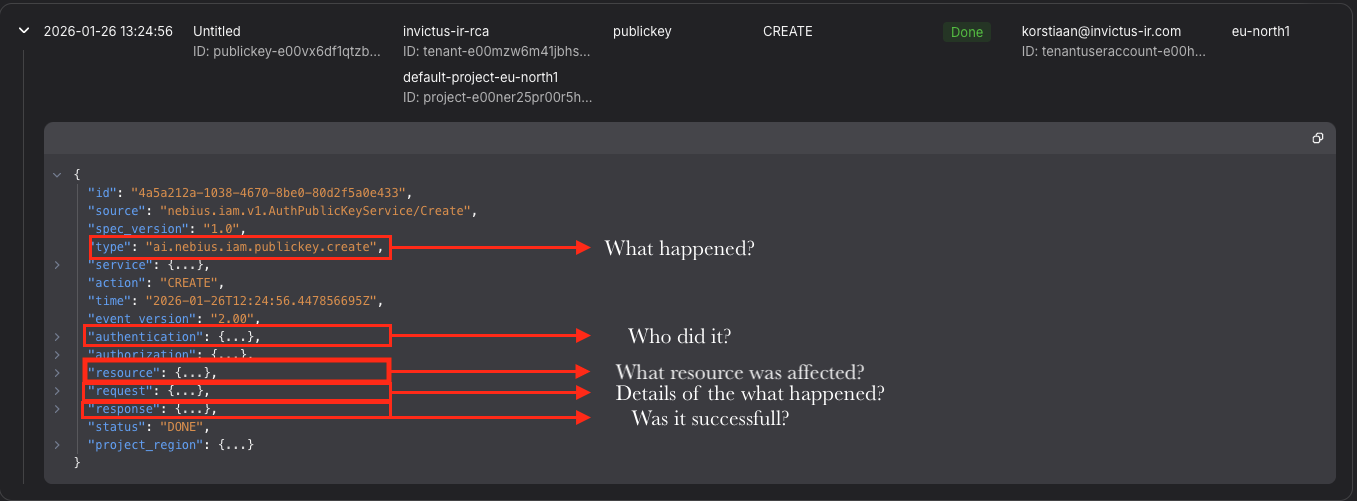
To help you with analysis we have created a table that contains an overview of the most important fields and their relevance for an IR scenario:
Currently the data plane logging can only be enabled via support.
Bases on our IR experience this means that most organizations will not log these events as it's not on by default. Keep in mind, these events are often contain the most relevant information in an IR such as who accessed a file and from where. If you are responsible for security, this is an important consideration.
Audit logging observations
Here are some things to keep in mind while performing audit log analysis in Nebius:
- Audit Logs service is still in Preview, no SLA commitments on log delay.
- Retention seems to be 90 days, not offficially documented.
- Exporting from the GUI is not possible, instead use the CLI to export the logs.
- On the tenant level, the audit logs are cross project, but not cross tenant. Make sure you check all the relevant tenants in your investigation.
- Audit logging is quite noisy, there's a lot of GET and LIST activity in an environment which doesn't mean actual user interaction. For example it records activity on behalf of a user that is generated by GUI activity.
Exporting the logs
If you're in an IR scenario and you need to export out all the logs there are two options.
- Dump the logs using the CLI, we build a script (Invictus-Nebius) for this purpose
- Forward the logs to an S3 bucket
We decided to build a script for the first option it leverages your CLI profile to identify all accessible tenants, quickly pulling the last 90 days of data into a JSON file. Once complete, the script prints a detailed acquisition summary for your records.
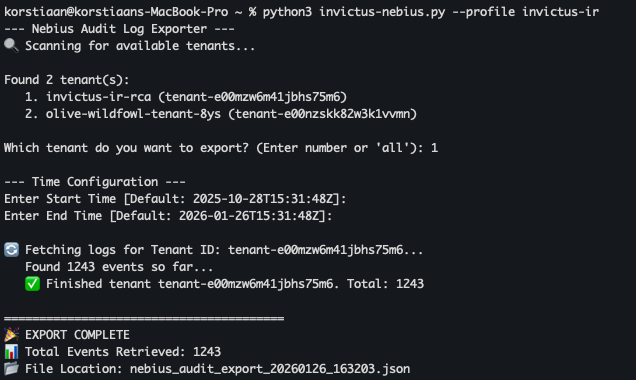
You can then begin your analysis in your favourite log analysis tool for further investigation.
The Incident Readiness Shortlist
If you or your customers are running workloads on Nebius, don't wait for the Friday 5 p.m. incident call. Here are the essential actions you should take right now to ensure you're ready to respond to an incident.
- Permissions.
- Ensure your security team has the necessary permissions to view all resources and logs before an event occurs.
- We recommend setting up a dedicated Incident Response Group in Nebius with pre-defined read-only or forensic roles. You don't want to be fighting IAM hurdles while an attacker is exfiltrating your data.
- Monitoring & Logging.
- Nebius offers 90 days of log retention via the GUI/CLI, but for true incident response, you need more. A minimum of 180 days is recommended.
- Forward your logs to a SIEM for long-term retention and, more importantly, to build proactive detection rules.
- Notifications.
- Navigate to Administration --> Notification settings.
- Ensure your security team is subscribed to relevant events. These notifications are often your first "canary in the coal mine" for security events that might otherwise slip through the cracks of manual monitoring.
We would love to help you with incident readiness or incident response in the (Neo) Cloud, contact us via info@invictus-ir.com or schedule a meeting directly.
Stay tuned for the next blog on Incident Response in the Neocloud!
About Invictus Incident Response
We are an incident response company and we ❤️ the cloud and specialize in supporting organizations in preparing and responding to a cyber attack. We help our clients stay undefeated!
🆘 Incident Response support reach out to cert@invictus-ir.com or go to https://www.invictus-ir.com/24-7
Be ready for the next cloud incident.